Order Own 1 at the Genesis price
You'll need
- A Base wallet with 100,000+ OPENX (paste it or connect it)
- Your shipping details
How the Genesis price works
Check my walletOpen Own 1 in the app. Paste your Base address or connect your wallet.
Wallet checkThe app reads your OPENX on Base. Nothing is moved or locked.
EligibleAt 100,000+ you get a congratulations message and the Genesis price unlocks.
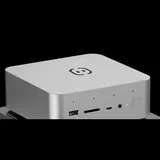 Buy nowThe Buy now button appears. Check out before January 1.
Step by step
- Open Own 1 and check your wallet In the app, open Own 1 (or tap Check my wallet on the website). Paste the Base address that holds your OPENX and tap Check my wallet. If you're connected, it fills in for you.
- See if you're eligible It reads your OPENX on Base. With 100,000+ you get a congratulations message (with a little confetti). Below that, it says Not eligible yet and shows exactly how many more OPENX you need.
- Tap Buy now The Buy now button only appears once your wallet passes the check. It opens the OwnX checkout. Choose your setup and pay.
- Link it when it arrives In OwnXOS: Settings → OpenX → Pair. Then, in the app, open Share compute, pick Own 1 and tap Link my Own 1.
| Price | |
|---|---|
| Genesis (100K+ OPENX, until Jan 1) | $2,899 |
| Regular | $3,799 |
Tip. Short of 100,000? The Wallet check shows exactly how many more you need. Buy on Uniswap, then tap Check again. Buy now appears as soon as the new balance shows up on Base.
Good to know. Own 1 is designed, made and shipped by OwnX. Checkout, shipping and warranty (3 years) are handled by OwnX.